
Coming soon
Everything in the TGI app
Every feature, for players, Captains and societies.

TGI Features

Your paper card, read by AI and on your handicap in minutes.
Play the way you always have. Fill in your paper card, then let TGI do the rest.
1

ScoreScan
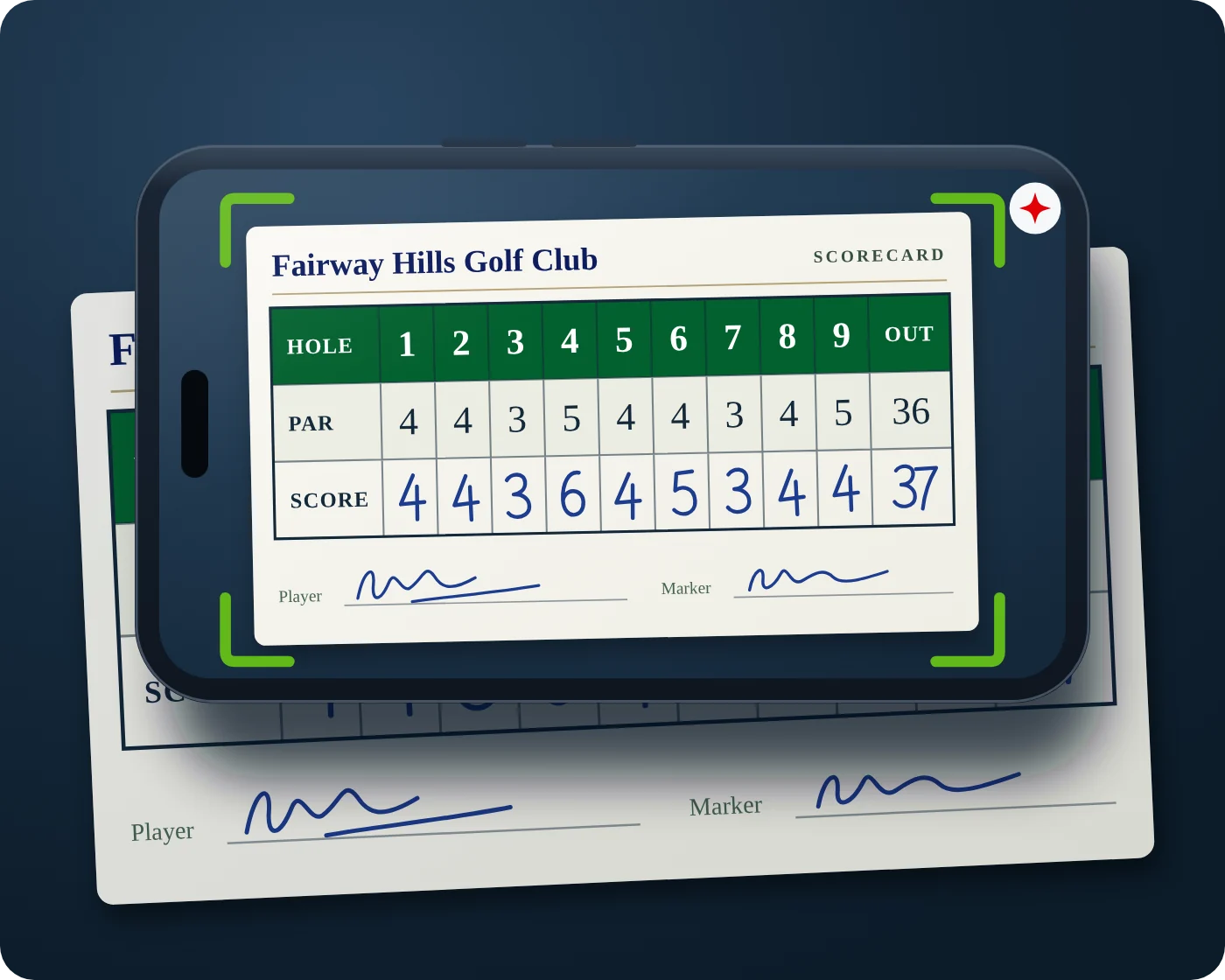
Scan your card
Photograph your signed paper card and TGI’s AI reads every hole for you. No typing in 18 scores.
2

ScoreSense
AI reads. You check. Marker confirms.
The AI reads each hole and flags anything unclear. You check it, then your marker confirms with a QR scan.
3

ScoreSync
Send for handicapping
Your confirmed card goes straight to the leaderboard and your PRI handicap, automatically.
Included for every TGI member, juniors too. Prefer your phone? Score hole by hole in the app instead.
Pick your game format first
Before you scan, choose your game format: Stableford, stroke play and more. The AI reads only your strokes, and TGI works out your Stableford points from your handicap and each hole’s stroke index. On society days, your Captain’s format is used.
Captains scan the whole field
Captains can scan players’ paper cards from one A to Z list: pick a player, scan, save, and you’re back at the list. A green tick shows who is done and a grey cross who is still to scan. When everyone is in, it goes straight to the leaderboard.
A handicap that follows you everywhere
Every round, at any course in Thailand, counts towards your PRI handicap, and it goes with you to every society.
What makes TGI different

Scan your paper card
Take a photo and TGI reads every hole.

Live updates
On every phone and the clubhouse TV.

Marker approval by QR
Your marker approves by phone camera.

Digital on-course scoring
One hole at a time, on your own phone.

Society game days
Entries, tee times, teams and near pins.

Every course in Thailand
Over 230 courses, tees and scorecards.
Society game days
From the first notice to the prize presentation.
TGI / F01
Score your way
Everyone scores on their own phone, or keeps their paper card as normal and scans it at the finish with ScoreScan.
TGI / F02
Live leaderboard and TV
Live scores on every phone and on the big screen at the bar.
TGI / F03
Marker approval by QR
Your marker approves your card with any phone camera. No paper chasing.
TGI / F04
Game days and entries
Name the day, post it once, edit it any time.
Explore this feature
The Captain sets up each game day once: course, date, tee time, format, tees and the day's fee. Members ask to play from their home page and the Captain confirms each one.
What you can do
- Create a game day with course, nines, date, tee time and format
- Formats include Stableford, Stroke Play (Medal), Par / Bogey, Maximum Score, Match Play, Skins and team games
- Set the handicap allowance and the men's and ladies' tees
- Show the day's fee for players to pay at the club
- Confirm, leave pending or decline each request to play
- Add up to 4 guests who are not TGI members (8 in the first 2 months after launch): each guest plays free once, then joins TGI
TGI / F05
Requests to play
Accept or decline each request.
Explore this feature
Members ask to play from their home page. The Captain sees every request in one list and decides on each one.
What you can do
- Accept a request and the player joins the list
- Decline privately, the player is told in the app
- Reserves fill the places when someone drops out
- Only the Captain sees the requests
TGI / F06
Playing groups
The tee sheet in seconds, with shotgun starts.
Explore this feature
Build the tee sheet in seconds. TGI can make the groups for you, or the Captain moves players by hand. Each player's playing handicap for the day is worked out automatically.
What you can do
- Let TGI make the groups, or arrange them yourself
- Swap players or move them to another group with a tap
- Set tee times, or a starting hole per group for a shotgun start
- See each player's handicap and playing handicap for the day
- Share the tee sheet with members or show it on a tablet
- Make teams separately for team formats
TGI / F07
AI Near Pin
One photo, measured by AI to the nearest centimetre.
Explore this feature
Measure near the pin from one photo, to the nearest centimetre. Every par 3 is a near pin hole, and the Captain can add any other hole. Take a photo with the ball and the hole in it, and the AI finds them and measures the distance for you.
What you can do
- Every par 3 is a near pin hole, and the Captain can choose any other hole
- On the hole, open Near pin and pick the player from your group or type a name
- Take a photo, or choose one, with the ball and the whole hole in the picture
- The AI puts red markers on the edge of the hole and a blue marker on the ball
- The hole is always 108 mm across, so it is the ruler, and its width and depth correct for the camera angle
- The distance is measured to the edge of the hole, to the nearest centimetre
- Tap Looks Right: Save Shot, or Place Them Myself to tap the edges and the ball
- No photo? The Captain or an administrator taps Enter Manually, picks the player and types the distance, for example 85 cm or 1.2 m
- Tap the pencil on any shot to change the player or the distance
- Each player's best shot is ranked closest first, with the results on the TV
TGI / F08
Inter-society and charity days
Play another society, or play for a cause.
Explore this feature
Play against another society on one leaderboard, or raise money for a good cause on a charity day.
What you can do
- Invite another society and its Captain to an inter-society day
- One leaderboard for everyone, with each player's society badge
- Set a charity, its cause and a fundraising target
- Keep a day as a draft until you confirm it
Your handicap and card
One handicap and one ID for all your golf.
TGI / F09
Handicap
Your PRI Handicap, from your best recent rounds at every course, rated or not.
Explore this feature
Your handicap is TGI's own. It is worked out from your best recent verified rounds, adjusted for how hard each course and tee is, so one number follows you to every society.
What you can do
- See your handicap and how it has moved over time
- Check which rounds count and which are kept out
- Start from a home club handicap that your Captain has confirmed
- Show your handicap on your TGI card at the first tee
- Read exactly how your handicap is worked out in the app
TGI / F10
Verified scores
Marker scans your QR, or Captain’s Visual Approval.
Explore this feature
A score only counts once someone else has checked it. At the end of the round you choose how: your marker scans your QR code with any phone camera and approves it, or at a society game you show your signed card to the Captain for Captain's Visual Approval.
What you can do
- Finish your round and show the approval QR code
- Your marker approves from their own phone camera, no app needed
- Photograph your signed paper card as proof
- Send your card to TGI to check if no marker is at hand
- Society games: choose Captain's Visual Approval and show the Captain your signed card
- See which of your rounds are approved and which are waiting
TGI / F11
Your TGI card
Your TGI number, handicap and societies.
Explore this feature
Every member has a TGI ID card on their phone. It shows your name, TGI number, handicap and societies, with a QR code a Captain can scan.
What you can do
- Show your card full screen at the first tee
- Your Captain scans the QR to add you to the society
- Juniors scan a parent's card to join
- Save or share the card as a picture
TGI / F12
Starting handicap
Start from your club handicap, checked once.
Explore this feature
New members start from the handicap they already have. Your Captain or TGI checks it once, then your handicap updates as you play.
What you can do
- Type your home club handicap and where it comes from
- Add a photo of your handicap card as proof
- Your Captain or TGI checks it and you get a notice when it is approved
- Check your playing handicap for any course and tee
TGI / F13
My Stats
Pars, birdies, bogeys and your handicap over all your rounds.
Explore this feature
Every round you finish builds your statistics. TGI counts your pars, birdies and bogeys and shows how your scores are trending.
What you can do
- See how many eagles, birdies, pars and bogeys you make
- Compare how you play par 3s, par 4s and par 5s
- Follow your recent form on a trend chart
- See your best round and your most pars in a round
TGI / F14
Juniors join free
Under 18 with a parent who is an Individual Gold or Premium Platinum member. Their statistics show how they improve.
Explore this feature
Golfers under 18 join TGI free when a parent is a TGI member. The junior scans the parent's TGI card and the parent gives consent. TGI checks the link before the junior plays.
What you can do
- Register as a Junior with your date of birth
- Scan your parent's TGI card or type their TGI number
- Your parent ticks their consent
- Play, score and build your own handicap
Play your golf
Score every round on your phone, verified and counted.
TGI / F15
Scan My Paper Card
Every member, juniors too. The AI reads the card and asks about any unclear numbers.
Explore this feature
Played with a paper card? Take a photo of it and the AI reads every hole. Any number it can't read clearly, such as untidy handwriting, is highlighted for you to check and fill in. Nothing is saved until every hole is checked.
What you can do
- Lay the card flat in good light and photograph the whole card
- The AI reads each player's hole scores, pick-ups and the pars on the card
- Unclear handwritten numbers are highlighted in yellow for you to fill in
- The hole scores are checked against the total written on the card
- Check each hole against the card, then save
- The photo stays with the round as proof
TGI / F16
Score My Round
Hole by hole, with your Stableford points live.
Explore this feature
Enter your score one hole at a time, like a paper card but easier. TGI knows the par and stroke index of every hole, so it shows your Stableford points live as you go.
What you can do
- Choose the course, the nines and your tee
- Pick your starting hole when you start your round, 1 to 18, set for you on shotgun days
- Enter strokes or pick up on a hole: your strokes count in the gross total and the hole scores 0 points, shown as 10P
- See your Stableford points on every hole and your running total
- Score for your marker as well, or let them score on their own phone
- Finish and show the QR code for approval
TGI / F17
Every course
236 Thai courses with tees, scorecards and nines.
Explore this feature
TGI holds 236 golf courses in Thailand, grouped by area. Each one has its tees, scorecard, pars and stroke index, and the nines or loops where a club has more than 18 holes.
What you can do
- Search by course name or browse by area
- Open a course to see every tee with its length and difficulty for men and ladies
- See the full scorecard with par and stroke index for every hole
- Pick the nines you are playing at clubs with 27 or 36 holes
- Start an individual round from the course page
TGI / F18
Round details
Every hole coloured, how your handicap moved, and your statistics over all your rounds.
Explore this feature
Every finished round has its own page: the score, Stableford points, how your handicap moved and a colour-coded board for every hole. My Stats adds it all up over your rounds.
What you can do
- See gross score and Stableford points for the round
- See your handicap before and after the round
- Read each nine hole by hole, coloured for eagles, birdies, pars and bogeys
- Open the full scorecard for the round
- My Stats: eagles, birdies, pars and bogeys over your last 1, 5, 10, 20 or all rounds
- Filter your statistics by course or dates and follow your form round by round
Running your society
Everything a Captain needs, free.
TGI / F19
Captain Home
Greets you by name, with a banner for each job.
Explore this feature
Captains get their own home page that greets them by name, for example "Hi Gerry, what would you like to do today?", with one banner for each job. On a game day it opens on that day's live leaderboard and the cards waiting for approval.
What you can do
- Add a new game, or update an existing one
- Write a game day report for the members
- Add a guest: up to 8 a game day in the first 2 months after launch, then 4
- On a game day: the live leaderboard and card approvals first
- Switch between Player Home and Captain Home
TGI / F20
Members and officers
Scan TGI cards, print QR sheets, name officers.
Explore this feature
The members list is the heart of the society. Captains add players by scanning their TGI card and name the officers who help run it.
What you can do
- Scan a member's TGI card to add them on the spot
- Print an A4 sheet of QR codes for the clubhouse
- See each member's handicap, with the society logo beside their name
- Name a Vice Captain and up to 3 administrators
- Message a member or remove them from the list
TGI / F21
Announcements and LINE
Send game days to the app and your LINE group.
Explore this feature
Turn a game day into a ready-made announcement and send it to members in the app and to the society's LINE group.
What you can do
- Preview the announcement with course, date, tees, fees and sponsor
- Edit the text before you send it
- Link the society's LINE group with a code
- Share game days, tee sheets and results to LINE
TGI / F22
Society chat
Notices, chat and private messages.
Explore this feature
Every society has its own chat. The Captain posts notices and members talk to each other. Players can also message each other privately.
What you can do
- Read notices and announcements from the Captain
- Talk to the whole society in the chat
- Send a private message to another player
- Send the Captain's announcements to the society's LINE group too
TGI / F23
Game day report
Tell members how the game went.
Explore this feature
After the game, the Captain tells everyone how it went: the winners, who played well and the best moments. Type it, then send it to members in the app and to the society's LINE group.
What you can do
- Type the report
- Check and edit the text before you send it
- Send it to every member in the app and to the LINE group
- Members see it with the day's results
TGI / F24
Sponsors
Thank sponsors on game days and hole boards.
Explore this feature
Societies can thank their sponsors in the app. Sponsors appear on game days and on hole sponsor boards, with their logo and a link.
What you can do
- Add sponsors with their logo, details and website
- Read a sponsor's details from a photo of their card or flyer
- Name a sponsor for a game day
- Show hole sponsors on the holes they sponsor
- Tap a sponsor's logo box to add their logo from a photo
- Thailand Golf Index is already in every society's sponsor library, ready to be the main sponsor or a hole sponsor
TGI / F25
Invite players
Share an invitation to join your society.
Explore this feature
Grow the society. Share a ready-made invitation that explains TGI and how to join.
What you can do
- Edit the invitation in your own words
- Share it by LINE, WhatsApp, email or any app
- New players join and ask to play from their home page
For Society Captains
Free for the Captain, Vice Captain and one administrator.
TGI / F26
QR card approval
No paper chasing at the end of the round.
Explore this feature
When a player finishes, the app shows a QR code for that card. The marker or Captain points any phone camera at it, sees the card on a web page and approves it.
What you can do
- Approve a card from any phone camera, with or without the app
- See every hole of the card before approving
- Approvals are saved on the TGI server straight away
- Captains see which cards are still waiting for approval
TGI / F27
Straight to your LINE group
Link your society’s LINE group once. Announcements, tee sheets, teams and results go straight into it, with icons.
Across TGI
For every member, whichever society you play in.
TGI / F28
Game alerts
One ping when new game days are posted.
Explore this feature
When your Captain posts new game days, you get one alert on your phone, not one for every change.
What you can do
- Get one alert when new game days are posted
- Open the alert straight to the game day
- Ask to play from the game day page
TGI / F29
Notifications
Notices, messages and requests in one place.
Explore this feature
One place for everything new: the Captain's notices, new game days, messages and requests.
What you can do
- Filter by society or system notices
- A red dot shows what you haven't opened yet
- Tap a notification to open it
- Mark everything as read in one tap
TGI / F30
PSC link
Your PSC Handicap beside your handicap, rounds sent to PSC.
Explore this feature
Pattaya Sports Club members can link their PSC membership. TGI checks your PSC number with PSC, shows your PSC Handicap beside your handicap, and sends your verified rounds to PSC for you.
What you can do
- Type your PSC number and full name
- See the details PSC holds and allow TGI to use them
- See your PSC Handicap beside your handicap
- Your verified rounds go to PSC without you doing anything
- Unlink at any time from the PSC page
TGI / F31
TGI Events
TGI’s own events, open to every member.
Explore this feature
TGI's own events, open to every member whichever society they play in, sit beside your society's games.
What you can do
- See upcoming TGI events with date, venue and details
- Find out more or enter from the event
- See your society's games on the same page and ask to play
TGI / F32
Promotions
Partner offers on green fees, shops and hotels.
Explore this feature
Offers from TGI's partners: green fees, golf shops, hotels and more, plus TGI's sponsors and advertisers.
What you can do
- See member offers with a code to show in store
- Each offer shows who it is from and when it ends
- Open the partner's offer or website
TGI / F33
My Devices
One phone and one tablet per member.
Explore this feature
Your membership works on one phone and one tablet. Sign in with the same TGI email on both.
What you can do
- See which phone and tablet are signed in
- Sign out a device you no longer use
- Your rounds and handicap follow you between devices
TGI / F34
Contact TGI
Send a question straight to TGI.
Explore this feature
Questions about membership, your handicap, your name or the app go straight to TGI administration.
What you can do
- Choose what your message is about
- Send it from the app with your TGI number attached
- See your messages and TGI's replies
Tournaments
Multi-round events for your society.
TGI / F35
Tournaments
Individual or team, live or private standings.
Explore this feature
Run multi-round tournaments: individual totals, or two teams playing matches such as Thailand v Rest of the World.
What you can do
- Choose individual or team, then set up the rounds
- Add members and guests, then split teams evenly by handicap
- Give each team a name and logo, and draw the matches for each round
- Show the standings live, or keep them private and reveal them at the presentation
- Name up to 3 tournament admins to help
Premium: the full TGI app
Everything in TGI, in every society you play in.
TGI / F36
Every society
Game days, leaderboards, near pins, results and chat.
Explore this feature
One TGI membership covers every society you join. Each society has its own games, leaderboards, results and chat, and they all sit together in the app.
What you can do
- Join as many societies as you like
- See each society's games together on your home page
- Follow each society's leaderboards, near pins and results
- Read each society's notices and chat
- Keep one handicap across all of them
Platform
How TGI works for every member.
TGI / F37
Society golf
Game days, entries, playing groups and live leaderboards, run by your Captain.
Explore this feature
Your society runs on TGI. The Captain posts the game days, members ask to play from their home page, and on the day everyone scores in the app while the leaderboard updates live.
What you can do
- See your society's next games on your home page, with date, course, format and the day's fee
- Ask to play with one tap and see when the Captain confirms you
- Check your playing group, tee time and starting hole
- Score your round hole by hole and follow the live leaderboard
- See near the pin winners, teams and the results presentation
- Read notices from the Captain and talk in the society chat
- Belong to several societies with one TGI membership
TGI / F38
Verified rounds only
Only rounds approved by your marker, your Captain or TGI count toward your handicap.
Explore this feature
Only checked rounds count toward your handicap. A round must be approved by your marker, your Captain or TGI before it changes your handicap.
What you can do
- Rounds approved by your marker count
- Your Captain can approve rounds for society days
- TGI checks rounds sent with a photo of the signed card
- Rounds still waiting for approval don't change your handicap
TGI / F39
Course difficulty
Where a tee is rated, its Men’s and Ladies’ difficulty is used, so a round at a hard course counts for more.
Explore this feature
Every rated tee has its own difficulty for men and for ladies. A good round on a hard course counts for more than the same score on an easy one.
What you can do
- See the men's and ladies' difficulty for every rated tee
- Ladies play the Captain's ladies' tee, usually red, with ladies' difficulty
- Change your tee before you start a round
- Rated courses carry a Rated course tag
TGI / F40
On your TGI card
Your handicap and TGI number are on your TGI ID card, ready to show your Captain.
Explore this feature
Your handicap and TGI number are always on your TGI ID card, so your Captain can check them on the spot.
What you can do
- Show your handicap and TGI number at the first tee
- Your Captain scans your card to add you
- Your card updates as your handicap changes
TGI / F41
Already a PSC member?
Enter your PSC membership name and number. TGI confirms them with Pattaya Sports Club, then your PSC member rate of ฿500 a year applies.
TGI / F42
Join Pattaya Sports Club
Not a PSC member yet? Join on PSC’s website, then add your PSC number in TGI.